

Chrome’s built-in reader mode has come a long way. With a single click, you can strip a webpage of ads, sidebars, and visual clutter. The read-aloud feature can narrate articles in a reasonably natural voice. For a free, no-install solution, it’s genuinely useful.
Which raises a fair question: do you actually need a dedicated extension like Reazy?
The short answer is: it depends on your needs. If you occasionally want to listen to a block of text while you read, Chrome’s native tools might work for you. But if you’re a student plowing through research papers, a professional catching up on industry reading during your commute, or someone with a disability that makes it difficult or impossible to read text from a screen, the gaps in Chrome’s offering might make it a less preferable tool.
Let’s break down where the built-in option works, where it falls short, and who benefits most from a dedicated text-to-speech app.
What Chrome Reader Mode Can Do
Free, Built-In, and Easy to Use: If you already use the Chrome browser, it simply requires a right click to find the option to “open in reading mode.”
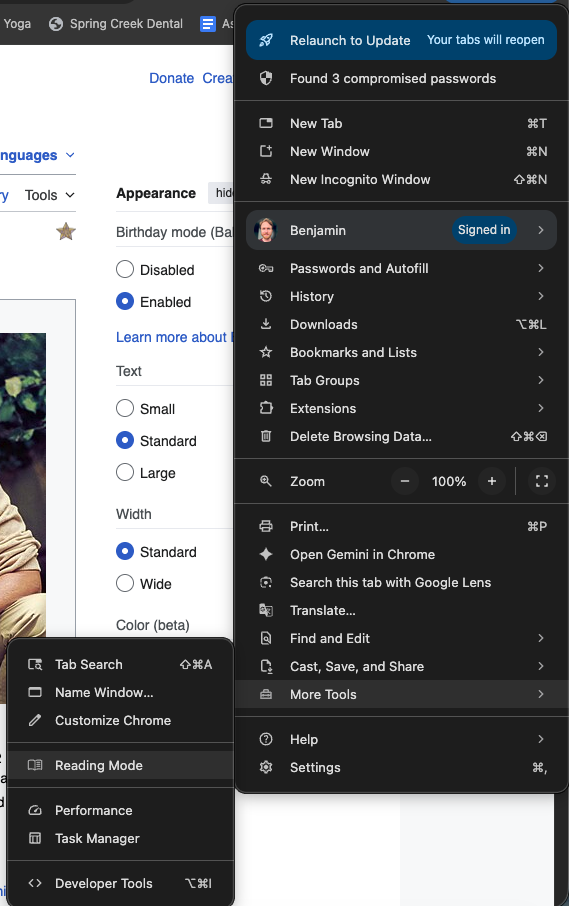
Clean Interface and Text Highlighting: The reading window offers a view of only the page’s enlarged text, and the tool highlights as it reads each word aloud.

Variable Playback Speed: In reader mode, you can adjust reading speed between .5 and 2x.
Functionality Across Devices: Reader mode is available for Chrome for desktop, Chromebooks, and Android devices.
…And What It Can’t Do
Lower Voice Quality: While Chrome’s reader mode text-to-speech offers a few different voice options, they are all generally less natural-sounding than those offered by most dedicated TTS tools.
No Document Library: Chrome’s free option doesn’t offer the ability to save pages for later reading. This also means no ability to sync across devices or organize your to-read pages.
No Screenshot Tool: As a built-in browser feature, reader mode doesn’t allow capturing of text from images, which prevents use with materials like lecture slides or physical textbook pages.
Web Pages Only: Likewise, reader mode offers only limited PDF support and doesn’t allow imported documents. There are also webpages it may not be able to read.
What Reazy Adds
Better Voices: Reazy’s voice options are designed to sound natural and to be easy to listen to and understand.
Document Library: The Reazy extension for Chrome allows you to save and organize pages to be read later.
Crop Tool: Screenshot any text on screen to instantly convert it to audio. Great for lecture slides, textbook pages, and photos of handwritten notes.
Dyslexia-First Design: The Reazy extension was designed with disability support needs in mind. With an interface designed to reduce cognitive load and features built to improve reading comprehension, it’s an excellent option for those with dyslexia or ADHD.
Sync Across Devices: With Reazy, you can start on a laptop and continue later on your phone without worrying about losing your progress.
Comparison Table
| Feature | Chrome Reader | Reazy Chrome Extension |
|---|---|---|
| Price | Free | Free |
| Voice Quality | Basic | High quality |
| Voice Options | Limited | More coming soon |
| Document Library | No | Yes (web & mobile app) |
| Crop Tool | No | Yes |
| PDF Support | Limited | Yes (web & mobile app) |
| Cross-Device Sync | No | Yes |
| Mobile | Android only | iOS & Android |
When Do You Need Reazy?
Chrome reader mode is probably enough:
- for occasional, casual use
- if you just want to try TTS
- if you only need basic web page reading
- if you don’t need to save or organize content
You need Reazy:
- for daily use for school/studying
- if you need to capture text from images/slides
- if you want to build a document library
- if you want higher quality voices
- if you want cross-device access
More About Reazy
Easy to Install and Use: Just add to your Chrome browser and start listening.
Web App: Not using Chrome? Check out the web app at app.reazy.pro.
The Verdict
Chrome reader mode is a great option if you’re interested in trialing a text-to-speech tool. It works just fine for a once-in-a-blue-moon itch to listen while you read. If you rely on text-to-speech for your daily reading, though, you’ll want to consider using a dedicated tool like Reazy.
If you try using TTS with Chrome’s built-in tool and find that TTS support is just what you’ve been needing, Reazy’s here to help you transition to more frequent use. Try the Chrome extension, web app, or mobile app for iOS and Android for free today.